November 10, 2025/
No Comments
Elevate your business landscape with our transformative solutions, harnessing innovation to drive…
We’ve all been there: you open your browser with good intentions, planning to quickly check one thing. Fast forward two hours, and you’re staring at 47 open tabs, your computer is running like molasses, and you’ve completely forgotten what you originally came to do. If this sounds familiar, you’re suffering from a modern digital ailment that’s more common than you might think – tab addiction.
TabLimit Pro is a Chrome extension specifically designed to break the cycle of tab overload and help you regain control of your browsing experience. But this isn’t just another productivity app – it’s a thoughtfully designed solution that addresses the psychological and practical challenges of modern web browsing.
Before diving into the solution, let’s acknowledge the real problem. Tab overload isn’t just about computer performance (though having 50+ tabs open certainly doesn’t help your RAM). The bigger issue is mental.
Research consistently shows that excessive multitasking – which is essentially what tab hoarding represents – reduces focus, increases stress, and diminishes cognitive performance. Every open tab represents a potential distraction, a half-finished task, or a “I’ll get to this later” commitment that weighs on your mental bandwidth.
TabLimit Pro recognizes that the solution isn’t just technical – it’s behavioral.
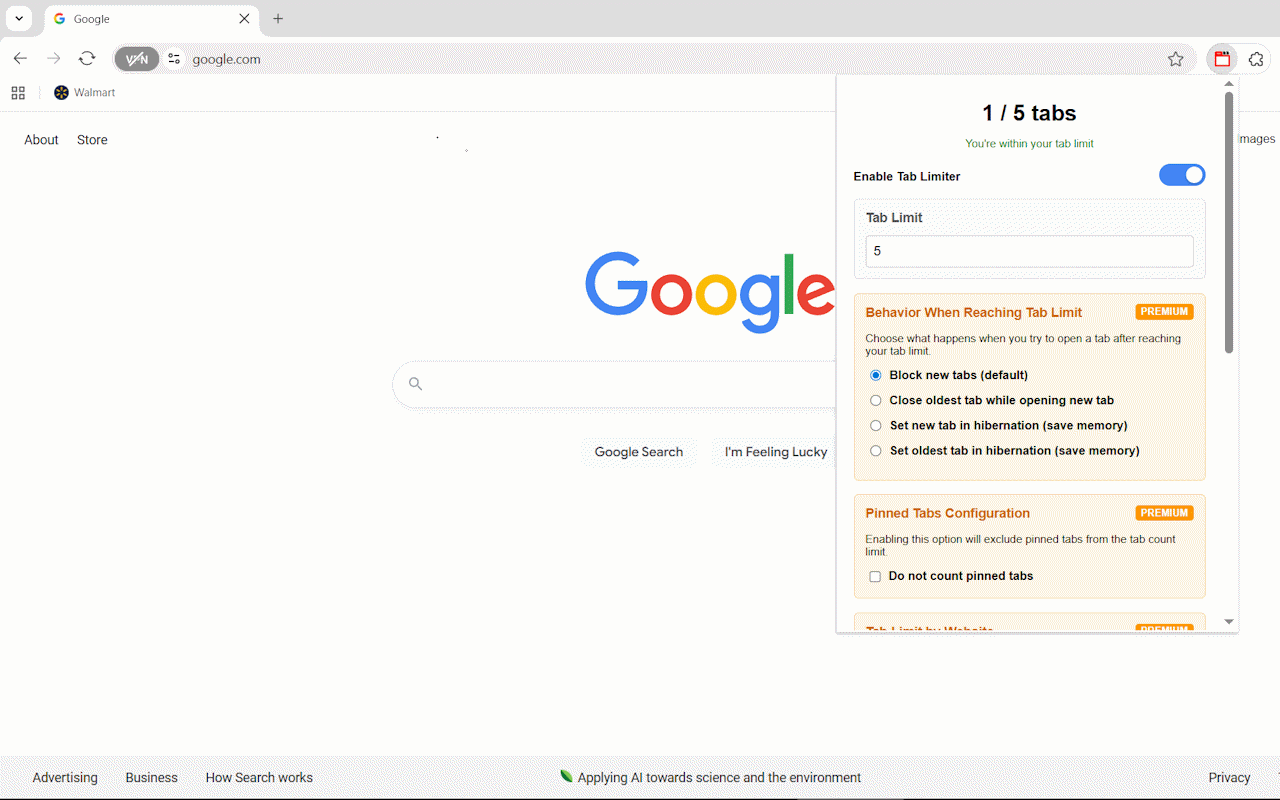
The core concept behind TabLimit Pro is elegantly simple: set a limit on how many tabs you can have open, then let the extension intelligently manage what happens when you hit that limit.
But here’s where TabLimit Pro gets clever. Instead of just blocking new tabs or randomly closing old ones, it offers several intelligent behaviors:
One of the standout features is tab hibernation. When you reach your limit, instead of losing tabs entirely, TabLimit Pro can put older tabs “to sleep.” These hibernated tabs consume virtually no memory but remain easily accessible when you need them. It’s like having the best of both worlds – memory efficiency without the anxiety of losing important pages.
The auto-close feature targets your least recently used tabs, ensuring that the content you’re actively working with stays available while clearing out the digital clutter that accumulates naturally during browsing sessions.
What sets TabLimit Pro apart from basic tab limiters is its understanding that different websites serve different purposes in your workflow.
The premium features include site-specific limits, which is brilliant for managing different types of browsing behavior. You might allow unlimited tabs for work-related sites like Google Drive or GitHub, while limiting yourself to just 3 YouTube tabs during work hours. This nuanced approach acknowledges that not all web browsing is created equal.
Essential tools like email, calendar apps, or project management platforms can be completely excluded from tab counting. Your core productivity tools remain always available without interfering with your focus limits for other types of browsing.
TabLimit Pro is particularly valuable for academic work, where research sessions can quickly spiral into dozens of open papers, articles, and reference materials. The site-specific limits let you maintain higher tab counts for educational resources while keeping entertainment sites strictly limited during study sessions.
For those working from home, the temptation to “quickly check” social media or news sites can derail productivity. TabLimit Pro helps maintain professional focus by setting strict limits on distracting sites while allowing unlimited access to work tools.
If you’re trying to cultivate more intentional technology use, TabLimit Pro supports mindful browsing by encouraging you to think carefully about what you really need open at any given moment.
What makes TabLimit Pro particularly effective is how it addresses the psychological aspects of tab management. The extension doesn’t just impose arbitrary restrictions – it helps you develop better browsing habits.
The visual feedback (like real-time tab counting and memory usage statistics) creates awareness of your browsing patterns. Many users report that simply seeing how many tabs they have open is enough to encourage more mindful browsing behavior.
The customizable notification system lets you choose how assertive you want the extension to be. Some users prefer gentle badge notifications, while others benefit from more prominent alerts when approaching their limits.
In an era where many extensions request extensive permissions and send data to external servers, TabLimit Pro takes a privacy-first approach. All functionality happens locally in your browser, with no data collection or external transmission.
The extension is also built with performance in mind. Ironically, an extension designed to improve browser performance could potentially slow things down if poorly implemented. TabLimit Pro uses minimal system resources while providing its functionality, ensuring that the cure isn’t worse than the disease.
The free version provides core tab limiting functionality with basic notifications – already enough to make a significant difference in your browsing experience.
The Premium upgrade unlocks the advanced behavioral options (hibernation, smart auto-close), site-specific limits, whitelist functionality, and settings backup. For users who want fine-grained control over their browsing environment, these features quickly justify the upgrade.
User feedback consistently highlights two main benefits: improved focus and reduced digital stress. The 40% improvement in browsing focus that users report isn’t just about productivity – it’s about feeling more in control of your digital environment.
The 30% reduction in browser memory usage is a tangible bonus, especially for users with older computers or limited RAM.
The beauty of TabLimit Pro is its simplicity. Install the extension, set your preferred tab limit (many users start with 10-15 tabs), choose your behavior preferences, and let the extension work in the background.
The learning curve is minimal, but the impact on your browsing habits can be significant. Most users find that even just having a tab limit in place naturally encourages more intentional browsing.
TabLimit Pro addresses a real problem that affects millions of browser users daily. Tab overload isn’t just a technical issue – it’s a focus and productivity challenge that reflects our complicated relationship with digital information.
By providing intelligent, customizable tab management, TabLimit Pro helps users develop healthier browsing habits while maintaining the flexibility needed for productive work.
If you find yourself constantly overwhelmed by browser tabs, struggling to focus while browsing, or dealing with sluggish browser performance due to tab overload, TabLimit Pro offers a thoughtful solution that respects both your productivity needs and your browsing preferences.
Ready to take control of your tabs? TabLimit Pro is available now in the Chrome Web Store, with both free and premium options to match your browsing style.
If you’ve ever found yourself drowning in dozens of browser tabs, frantically clicking through windows trying to find that one important page you opened hours ago, you’re not alone. Tab overload is a modern productivity killer that affects everyone from researchers to developers to digital marketers. Enter SessionFlow – a Chrome extension that transforms tab chaos into organized, productive browsing.
Let’s be honest: modern web browsing is messy. You start with good intentions – maybe just a few tabs for a specific project. But before you know it, you have 30+ tabs spread across multiple windows, your browser is crawling, and you’ve lost track of everything important. Sound familiar?
Traditional bookmarks don’t solve this problem because they’re static. You need something dynamic that preserves your entire browsing context and helps you organize your digital workspace intelligently.
SessionFlow isn’t just another bookmark manager or tab organizer. It’s a comprehensive session management system designed for power users who need to maintain complex browsing workflows without losing their sanity.
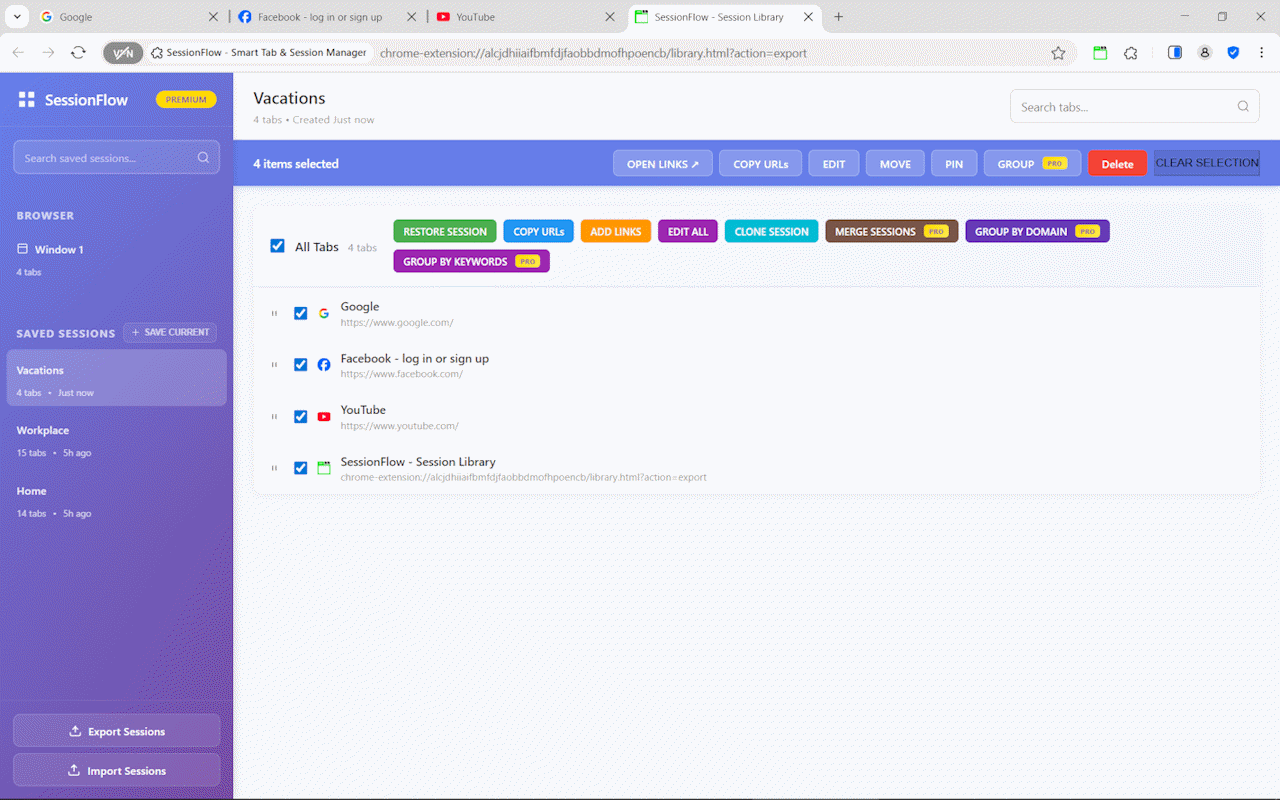
The core functionality of SessionFlow is deceptively simple: save your entire browsing state with a single click. But the devil is in the details. Unlike basic session savers, SessionFlow preserves:
This means when you restore a session, you’re not just getting a list of URLs – you’re getting back your exact browsing environment.
One of SessionFlow’s standout features is its powerful search functionality. Instead of manually clicking through tabs, you can instantly locate any open tab by searching for:
This feature alone can save hours of frustration for anyone who regularly works with multiple research projects or complex browsing sessions.
SessionFlow’s smart grouping algorithms understand your browsing patterns and automatically organize related tabs. Whether you’re researching competitors, managing multiple client projects, or diving deep into technical documentation, the extension learns your workflow and suggests optimal organization strategies.
How many times have you accidentally opened the same page multiple times? SessionFlow automatically detects and eliminates duplicate tabs across all windows, keeping your workspace clean and your computer’s memory happy.
For professionals who need to open specific sets of URLs regularly – think daily monitoring dashboards, research check-ins, or project status pages – the bulk URL opener is a game-changer. No more manually opening each link or dealing with bookmark folders.
One of the biggest productivity killers with heavy tab usage is browser performance degradation. SessionFlow’s hibernation system automatically sleeps inactive tabs while preserving their state, keeping your browser responsive even with dozens of tabs open.
Organize sources by topic, maintain separate sessions for different projects, and preserve complete research trails. The session comparison feature is particularly valuable for tracking how your research evolves over time.
Maintain separate environments for different projects, organize documentation tabs logically, and quickly switch between development contexts. The ability to share session templates with team members streamlines onboarding and collaboration.
Track multiple campaigns simultaneously, monitor competitor activities across different sessions, and organize client projects with dedicated browsing environments. The analytics features help identify which tools and resources you use most frequently.
Organize course materials by subject, manage assignment research, and preserve study sessions for later review. The export functionality makes it easy to share resource collections with classmates or colleagues.
SessionFlow’s auto-save functionality ensures you never lose important browsing sessions due to crashes, updates, or accidental closures. The system intelligently detects significant changes and preserves your work automatically.
All session data is stored locally by default, giving you complete control over your browsing information. Premium users can opt into encrypted cloud sync while maintaining data ownership and privacy.
Understanding your browsing patterns is key to optimization. SessionFlow provides insights into your tab usage, session frequency, and productivity metrics, helping you identify and eliminate time-wasting habits.
The free version of SessionFlow includes core session management, tab search, and basic organization tools – already more powerful than most competing extensions.
The Premium upgrade unlocks automation features like scheduled auto-saves, advanced hibernation controls, unlimited session storage, and sophisticated analytics. For professionals who live in their browser, the Premium features quickly pay for themselves in time savings.
Installing SessionFlow takes seconds, and the intuitive interface means you can start organizing your tabs immediately. The extension works seamlessly with your existing browsing habits – there’s no steep learning curve or complex setup process.
If you’re tired of tab chaos affecting your productivity, SessionFlow offers a comprehensive solution that grows with your needs. It’s not just about organization; it’s about creating a browsing environment that enhances rather than hinders your work.
For anyone who regularly juggles multiple projects, conducts extensive research, or simply wants a more organized digital workspace, SessionFlow represents a significant upgrade to the basic tab management most browsers provide.
Ready to transform your browsing experience? SessionFlow is available now in the Chrome Web Store, with both free and premium options to suit your workflow needs.


Elevate your business landscape with our transformative solutions, harnessing innovation to drive…
Elevate your business landscape with our transformative solutions, harnessing innovation to drive…

CodingDir is a premier development company, offering custom web, app, and AI solutions designed to boost efficiency, innovation, and business growth.
Copyright © 2024 CodingDir