December 2, 2025/
No Comments
Elevate your business landscape with our transformative solutions, harnessing innovation to drive…
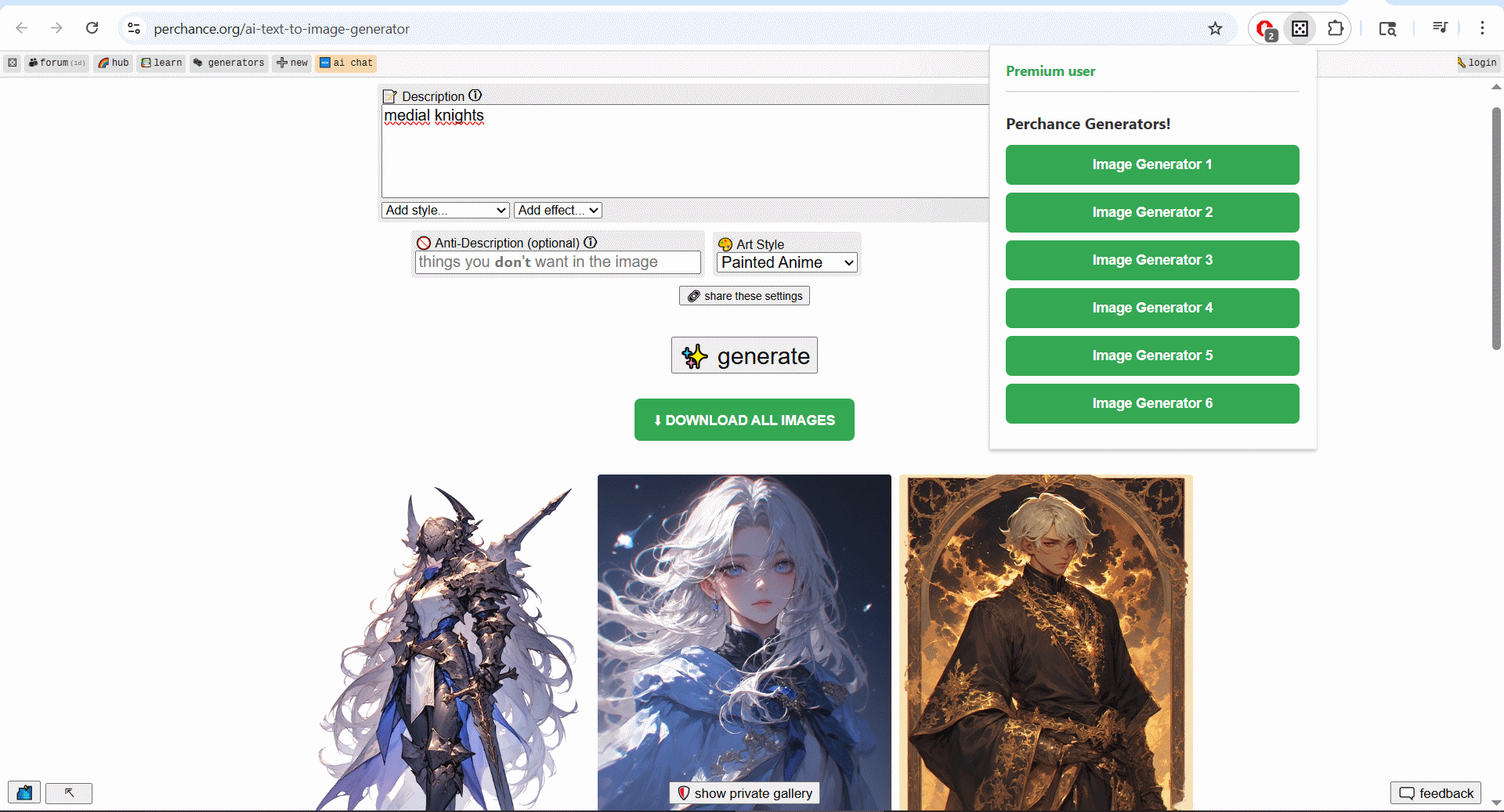
If you’ve ever used the Perchance AI Text-to-Image Generator, you know the excitement of watching your creative prompts transform into stunning visual art. You also know the crushing tedium that follows: right-clicking dozens of generated images, navigating save dialogs, and manually organizing files one by one. What should be the fun part of AI art creation becomes an exhausting administrative task.
Perchance Bulk Image Downloader eliminates this workflow bottleneck entirely. This Chrome extension transforms hours of manual image saving into a single click operation, letting you focus on what actually matters: creativity and iteration.
AI image generation has democratized visual creativity in unprecedented ways. Platforms like Perchance make it possible for anyone to create professional-quality artwork using nothing but text descriptions. But there’s a cruel irony embedded in this creative revolution: the better you get at prompting and the more iterations you create, the more time you waste on file management.
Consider a typical AI art session. You craft a prompt, generate 10-20 variations, refine your approach, generate another batch, maybe experiment with different styles or parameters. Before you know it, you’ve created 50+ images that represent hours of creative exploration. Then reality hits: saving each image manually will take almost as long as creating them did.
This workflow friction doesn’t just waste time – it actively discourages the iterative experimentation that leads to breakthrough creative work.
The extension’s core functionality is elegantly simple: one click downloads your entire Perchance gallery as an organized ZIP file. But the sophistication lies in how it handles the technical challenges and workflow considerations that make this seemingly simple task so complex.
When you download dozens of AI-generated images manually, you inevitably end up with a folder full of cryptically named files that are impossible to organize later. The extension automatically creates numbered filenames (perchance-image-001.png, perchance-image-002.png, etc.) that maintain chronological order and prevent naming conflicts.
This systematic approach becomes crucial when you’re working on projects that involve hundreds of generated images across multiple sessions.
One concern with bulk download tools is whether they maintain the original quality of images. The Perchance Bulk Image Downloader preserves full resolution and original format integrity, ensuring that your downloaded images are identical to what Perchance generated.
For professional artists and commercial creators, this quality assurance is essential for maintaining workflow standards and ensuring usable final outputs.
Not every AI-generated image is a keeper. The extension includes a fullsize preview feature that lets you examine images at full resolution before committing to downloads. This preview system is intelligently positioned to avoid screen obstruction and provides the visual information needed to make informed curation decisions.
This preview functionality transforms the bulk download process from “save everything and sort later” to “curate intentionally and save selectively.”
AI image generation has become an essential tool in the concept development phase of digital art. Artists use tools like Perchance to rapidly explore visual ideas, generate reference materials, and develop mood boards. The bulk download extension makes it practical to generate comprehensive concept libraries without administrative overhead.
For artists working on client projects with tight deadlines, the time savings can be the difference between meeting deadlines and missing opportunities.
Visual content creation for social media, blogs, and marketing materials often requires generating multiple variations of similar concepts. A social media manager might need 20 different versions of a promotional graphic to test which style resonates best with their audience.
The extension makes this type of iterative content creation practical by eliminating the file management bottleneck.
Game development involves extensive visual exploration – character concepts, environment designs, texture references, and mood development. AI tools like Perchance can generate hundreds of concept variations that inform final design decisions.
For development teams working with asset pipelines, the organized ZIP export format integrates cleanly with existing file management systems.
Product marketing often requires diverse visual assets – different angles, lighting conditions, promotional styles, and demographic targeting. AI generation can produce these variations quickly, but only if the workflow for managing generated assets is efficient.
The premium tier’s watermark-free downloads are particularly valuable for commercial applications where professional presentation standards matter.
The free tier provides access to core functionality with some limitations – users can download the first 3 images per session with watermarks. This trial approach allows users to experience the workflow benefits before making a financial commitment.
The premium upgrade removes download limits and eliminates watermarks, making it suitable for professional and commercial applications. For creators who regularly generate large batches of images, the time savings alone justify the premium cost within a few sessions.
The watermark removal in premium isn’t just about aesthetics – it’s about commercial usability. Content creators, marketing professionals, and commercial artists need clean, professional-quality assets for client work, presentations, and public-facing materials.
One often-overlooked aspect of AI art tools is data privacy. The Perchance Bulk Image Downloader processes all images locally in your browser, meaning your generated artwork never touches external servers beyond the original Perchance platform.
For artists working on confidential projects, client work, or proprietary concepts, this local processing approach provides important privacy protections.
The extension is designed to enhance rather than disrupt the creative process. Controls appear contextually when needed, the bulk download button integrates naturally with the Perchance interface, and preview overlays position intelligently to avoid workflow interruption.
This thoughtful integration means creators can maintain their focus on the creative aspects of AI art generation without being pulled into technical concerns.
Professional creative workflows often involve generating large numbers of variations for later refinement. Instead of spending 30+ minutes manually saving 50 images, creators can export everything instantly and focus their time on the high-value work of curation and refinement.
AI art creation is inherently iterative. You generate a batch, analyze the results, refine your prompts, and generate another batch. The extension makes it practical to preserve comprehensive records of these exploration cycles without workflow friction.
The organized ZIP export format makes it easy to share exploration results with team members, clients, or collaborators. Instead of manually selecting and organizing files for sharing, creators can simply share complete exploration sets.
The extension handles complex technical challenges – dynamic page loading, varying image formats, file organization, and secure payment processing – while presenting a simple, intuitive interface to users.
This technical sophistication is particularly important for Perchance integration, where the platform’s dynamic image loading and interface behavior require careful handling to ensure reliable bulk downloads.
Perchance Bulk Image Downloader addresses a specific but critical bottleneck in AI art creation workflows. By eliminating the tedious manual work of image management, it allows creators to focus on what they do best: creating and iterating.
For anyone who uses Perchance regularly – whether for professional work, creative exploration, or commercial projects – the extension transforms AI art generation from a partially manual process into a fully digital, scalable workflow.
The tool doesn’t just save time; it makes creative approaches possible that would otherwise be too administratively burdensome to attempt. In the rapidly evolving world of AI-assisted creativity, that workflow efficiency can be the difference between keeping up and falling behind.
Ready to streamline your AI art workflow? Perchance Bulk Image Downloader is available now in the Chrome Web Store, with both free trial and premium options.
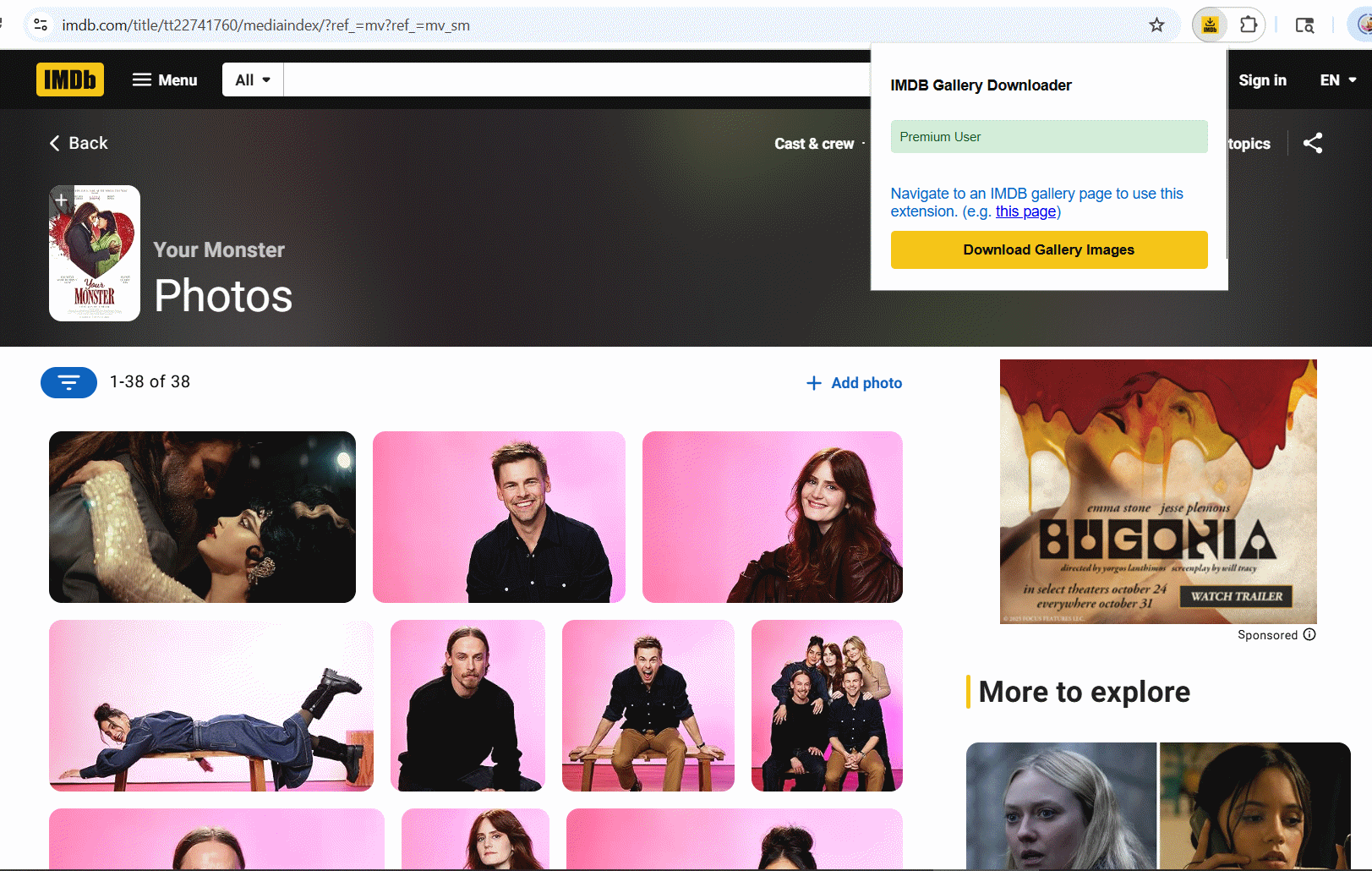
If you’ve ever tried to save images from an IMDB gallery, you know the frustration. You find the perfect collection of high-resolution movie stills, behind-the-scenes photos, or promotional images, but saving them means clicking through dozens (sometimes hundreds) of images, right-clicking each one, navigating save dialogs, and manually organizing files. It’s tedious, time-consuming, and frankly, soul-crushing when you just want to build a collection of your favorite film imagery.
IMDB Gallery Downloader solves this problem with elegant simplicity: one click downloads entire IMDB galleries as organized zip files. But this isn’t just about convenience – it’s about preserving film history and making movie appreciation more accessible.
IMDB hosts some of the most comprehensive collections of film and television imagery on the internet. From rare behind-the-scenes production stills to high-quality promotional photos, these galleries are treasure troves for movie enthusiasts, film students, graphic designers, and content creators.
However, IMDB’s interface is designed for browsing, not collecting. The platform makes it deliberately difficult to bulk download images, presumably to manage server load and protect content rights. This creates a barrier between users and the content they want to legitimately use for personal collections, academic research, or creative projects.
The extension transforms what used to be an hours-long manual process into a simple one-click operation. But the real sophistication lies in how it handles the technical challenges of modern web interfaces.
Modern web galleries use lazy loading – images only load as you scroll down the page. This means that even if you could somehow select all images at once, you’d only get the first few dozen that have actually loaded.
IMDB Gallery Downloader intelligently handles this by automatically scrolling through the entire gallery, waiting for images to load, and ensuring that every single photo is captured. This automated scrolling works even on galleries with hundreds of images, making it possible to download complete collections that would be practically impossible to save manually.
One of the most valuable aspects of the extension is its ability to fetch the highest resolution versions of images available. When you right-click and save an image from IMDB, you often get a compressed or smaller version. The extension bypasses these limitations and grabs images directly from IMDB’s servers at their maximum available resolution.
For photographers studying cinematography, film students analyzing visual techniques, or collectors who want archival-quality images, this quality preservation is invaluable.
The extension doesn’t just dump all images into a generic folder. It automatically creates organized zip files with proper naming conventions based on the movie or TV show title. This means your downloads are immediately ready for cataloging without additional manual organization.
IMDB galleries often contain production stills that aren’t available elsewhere – candid shots from sets, alternate promotional materials, and historical photos that provide insight into filmmaking processes. The ability to quickly download complete collections makes research and analysis much more efficient.
High-quality film imagery is valuable for creating presentations, mood boards, social media content, or educational materials. The extension makes it practical to build comprehensive libraries of reference materials without spending hours on manual downloads.
For people who maintain digital collections of film memorabilia, the extension enables building comprehensive archives of promotional materials, cast photos, and production imagery that complement their movie collections.
Studying the visual language of film often requires analyzing multiple images from the same production. The extension makes it easy to download complete visual stories for analysis and inspiration.
Instead of spending research time on image collection, students and scholars can focus on actual analysis. Download complete visual narratives from films for frame-by-frame study or comparative analysis between different movies.
Designers and artists can build comprehensive mood board libraries, collecting visual inspiration from multiple films and organizing them by genre, era, or visual style.
Teachers and trainers can quickly assemble visual materials for film studies courses, cinematography workshops, or media literacy programs.
Movie enthusiasts can create backup collections of imagery from their favorite films, ensuring access to high-quality visuals even if they become harder to find online.
What makes IMDB Gallery Downloader impressive isn’t just what it does, but how cleanly it does it. The extension handles complex technical challenges – dynamic page loading, varying image formats, server rate limiting, and file organization – while presenting a simple, one-button interface to users.
The real-time progress bar provides transparency about what’s happening during downloads, which is particularly important when processing large galleries that might take several minutes to complete.
The extension works across all types of IMDB galleries – movie titles, TV shows, actor profiles, director pages, and event coverage. This universal compatibility means you can use the same tool whether you’re collecting images from a specific film, building an archive of a particular actor’s career photos, or downloading coverage from film festivals and premieres.
It’s worth noting that while the extension makes image collection easier, users should still respect copyright and fair use guidelines. The tool is designed for personal use, educational purposes, and legitimate research – not for commercial redistribution of copyrighted material.
The extension simply automates what users could already do manually, making it more practical to build personal collections and conduct research that would otherwise be prohibitively time-consuming.
Using IMDB Gallery Downloader is refreshingly simple:
The learning curve is essentially zero, but the impact on your ability to work with IMDB imagery is transformative.
IMDB Gallery Downloader addresses a specific but significant pain point for anyone who regularly works with film imagery. By automating the tedious process of manual image saving, it makes film research, creative projects, and personal collecting much more accessible.
For students, professionals, and enthusiasts who need access to high-quality film imagery, the extension represents the difference between spending hours on manual labor and actually focusing on the creative or analytical work that matters.
The extension doesn’t just save time – it makes projects possible that would otherwise be too tedious to attempt. In a world where visual research and reference collection are increasingly important, tools like this become essential productivity enablers.
Ready to build your film image library efficiently? IMDB Gallery Downloader is available now in the Chrome Web Store.
Picture this scenario: you’re working on a challenging project and need AI assistance. You open ChatGPT, type your prompt, get a response. Then you think, “I wonder what Claude would say about this?” So you open another tab, navigate to Claude, wait for it to load, copy-paste your prompt, and wait for another response. Rinse and repeat for Gemini, Perplexity, and any other AI you want to consult.
If this tedious process sounds familiar, Superpower Multi-AI Chat is about to revolutionize your AI workflow. This Chrome extension eliminates the exhausting cycle of tab-switching and prompt-copying by letting you send the same query to 70+ AI platforms simultaneously.
We’re living in the golden age of AI, but this abundance creates a new challenge: choice paralysis and workflow inefficiency. Different AI models excel at different tasks – Claude might give you the best writing advice, while ChatGPT excels at coding, and Gemini provides excellent research insights.
The logical approach is to consult multiple AIs for important decisions, but the manual process is incredibly time-consuming. Professional AI users often spend more time managing their AI workflow than actually benefiting from AI assistance.
The core concept is elegantly simple: write your prompt once, select which AI platforms you want to query, and let the extension handle the rest. But the execution is where this extension truly shines.
When you click “Send to Selected AI Sites,” the extension doesn’t just copy your prompt to your clipboard and wish you luck. It intelligently opens browser tabs for each selected platform, waits for pages to load completely, automatically submits your prompt, and provides real-time progress tracking so you know exactly what’s happening.
This level of automation transforms what used to be a 20-minute manual process into a 30-second automated workflow.
While most users think of AI as text generation, Superpower Multi-AI Chat recognizes the broader AI landscape. The extension supports:
This comprehensive approach makes it valuable for creative professionals, marketers, and content creators who work across multiple media types.
For digital marketers and content creators, the ability to generate multiple versions of copy simultaneously is transformative. Instead of iterating through different AI platforms manually, you can:
The result? Better content through diversity, achieved in a fraction of the time.
Developers face complex problems that benefit from multiple AI perspectives. With Superpower Multi-AI Chat, you can:
Having multiple AI models tackle the same coding challenge often reveals solutions that no single AI would provide.
For researchers, students, and professionals conducting analysis, cross-referencing AI responses is crucial for accuracy and comprehensiveness. The extension enables:
One of the most sophisticated aspects of Superpower Multi-AI Chat is its session continuation functionality. You’re not limited to single-prompt interactions. You can maintain ongoing conversations with multiple AIs simultaneously, allowing for:
This feature transforms the extension from a simple prompt broadcaster into a comprehensive AI collaboration platform.
The extension includes thoughtful productivity features that address real user needs:
You don’t always need all 70+ platforms. The filtering system lets you focus on specific types of AI (chat, images, videos) or search for particular platforms by name.
Real-time indicators show you which AIs are processing, which have completed, and which might need attention. No more wondering if a particular platform is still thinking or has encountered an error.
Your prompts are automatically saved, so you can resume work exactly where you left off, even after closing your browser.
The free tier provides access to 3 premium AI chatbots with full functionality – enough to experience the power of multi-AI querying without any financial commitment.
The premium upgrade unlocks the complete ecosystem of 70+ platforms, including specialized image and video AI tools. For professionals who regularly use AI in their work, the time savings quickly justify the investment.
In an era of increasing data privacy concerns, Superpower Multi-AI Chat takes a local-first approach. The extension doesn’t store or transmit your prompts to third-party servers – it simply automates the manual process of navigating to AI sites and submitting queries.
The extension is also built with performance in mind, using minimal system resources while managing potentially dozens of AI interactions simultaneously.
The AI field is evolving rapidly, with new models and platforms launching regularly. Superpower Multi-AI Chat is designed to grow with this ecosystem, continuously adding support for new platforms as they emerge.
This future-proofing aspect means your investment in learning and integrating the extension into your workflow becomes more valuable over time, rather than becoming obsolete.
Generate diverse creative outputs and compare different AI writing styles to find the perfect tone and approach.
Access multiple coding perspectives and debugging approaches to solve complex technical challenges faster.
Cross-reference information across multiple AI knowledge bases to ensure accuracy and comprehensiveness.
Make better decisions by consulting multiple AI advisors and comparing strategic recommendations.
Explore different artistic interpretations by generating images and videos across multiple AI platforms simultaneously.
Superpower Multi-AI Chat addresses a genuine productivity bottleneck in the modern AI workflow. As AI becomes increasingly central to knowledge work, the ability to efficiently leverage multiple AI platforms becomes a competitive advantage.
The extension doesn’t just save time – it improves the quality of AI-assisted work by making it practical to seek multiple perspectives and compare different AI approaches to the same problem.
For anyone who regularly uses AI for professional work, creative projects, or research, Superpower Multi-AI Chat transforms AI from a helpful tool into a powerful collaborative network.
Ready to supercharge your AI productivity? Superpower Multi-AI Chat is available now in the Chrome Web Store, with both free and premium options to match your AI usage needs.
We’ve all been there: you open your browser with good intentions, planning to quickly check one thing. Fast forward two hours, and you’re staring at 47 open tabs, your computer is running like molasses, and you’ve completely forgotten what you originally came to do. If this sounds familiar, you’re suffering from a modern digital ailment that’s more common than you might think – tab addiction.
TabLimit Pro is a Chrome extension specifically designed to break the cycle of tab overload and help you regain control of your browsing experience. But this isn’t just another productivity app – it’s a thoughtfully designed solution that addresses the psychological and practical challenges of modern web browsing.
Before diving into the solution, let’s acknowledge the real problem. Tab overload isn’t just about computer performance (though having 50+ tabs open certainly doesn’t help your RAM). The bigger issue is mental.
Research consistently shows that excessive multitasking – which is essentially what tab hoarding represents – reduces focus, increases stress, and diminishes cognitive performance. Every open tab represents a potential distraction, a half-finished task, or a “I’ll get to this later” commitment that weighs on your mental bandwidth.
TabLimit Pro recognizes that the solution isn’t just technical – it’s behavioral.
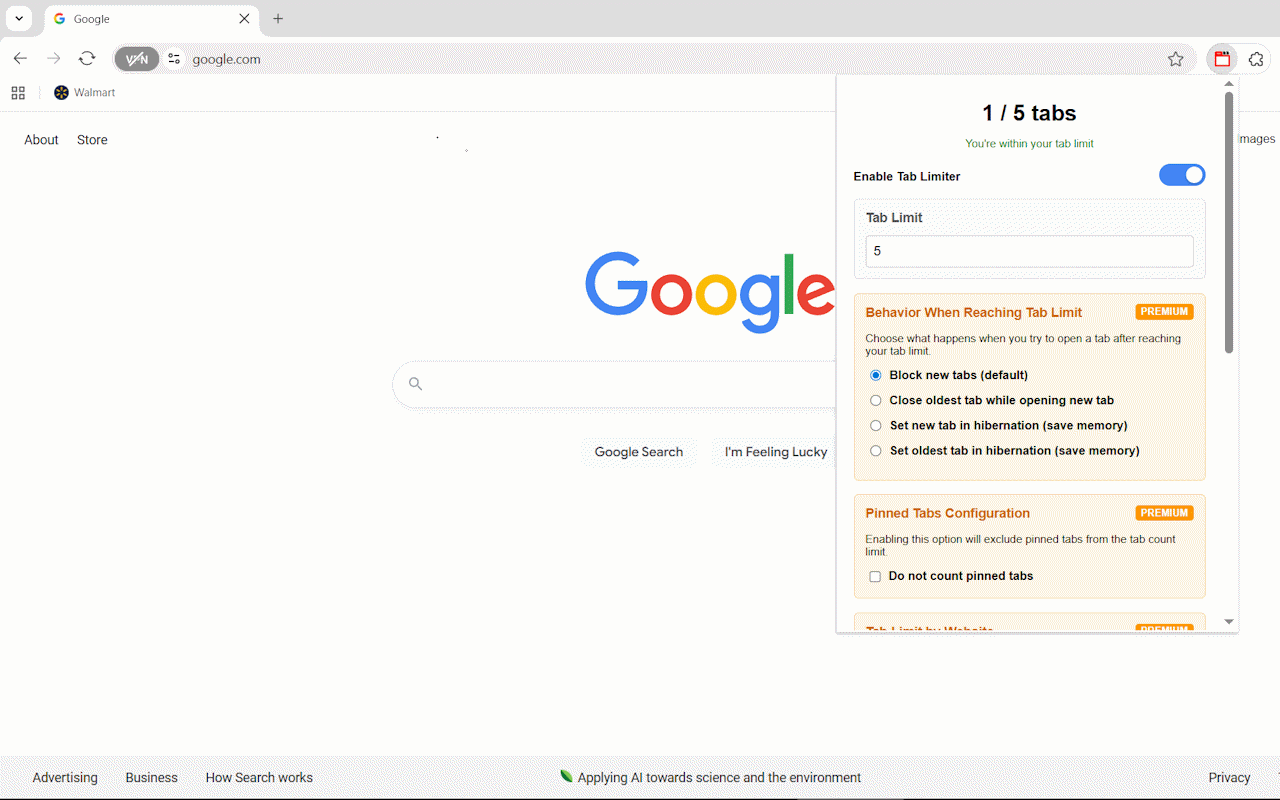
The core concept behind TabLimit Pro is elegantly simple: set a limit on how many tabs you can have open, then let the extension intelligently manage what happens when you hit that limit.
But here’s where TabLimit Pro gets clever. Instead of just blocking new tabs or randomly closing old ones, it offers several intelligent behaviors:
One of the standout features is tab hibernation. When you reach your limit, instead of losing tabs entirely, TabLimit Pro can put older tabs “to sleep.” These hibernated tabs consume virtually no memory but remain easily accessible when you need them. It’s like having the best of both worlds – memory efficiency without the anxiety of losing important pages.
The auto-close feature targets your least recently used tabs, ensuring that the content you’re actively working with stays available while clearing out the digital clutter that accumulates naturally during browsing sessions.
What sets TabLimit Pro apart from basic tab limiters is its understanding that different websites serve different purposes in your workflow.
The premium features include site-specific limits, which is brilliant for managing different types of browsing behavior. You might allow unlimited tabs for work-related sites like Google Drive or GitHub, while limiting yourself to just 3 YouTube tabs during work hours. This nuanced approach acknowledges that not all web browsing is created equal.
Essential tools like email, calendar apps, or project management platforms can be completely excluded from tab counting. Your core productivity tools remain always available without interfering with your focus limits for other types of browsing.
TabLimit Pro is particularly valuable for academic work, where research sessions can quickly spiral into dozens of open papers, articles, and reference materials. The site-specific limits let you maintain higher tab counts for educational resources while keeping entertainment sites strictly limited during study sessions.
For those working from home, the temptation to “quickly check” social media or news sites can derail productivity. TabLimit Pro helps maintain professional focus by setting strict limits on distracting sites while allowing unlimited access to work tools.
If you’re trying to cultivate more intentional technology use, TabLimit Pro supports mindful browsing by encouraging you to think carefully about what you really need open at any given moment.
What makes TabLimit Pro particularly effective is how it addresses the psychological aspects of tab management. The extension doesn’t just impose arbitrary restrictions – it helps you develop better browsing habits.
The visual feedback (like real-time tab counting and memory usage statistics) creates awareness of your browsing patterns. Many users report that simply seeing how many tabs they have open is enough to encourage more mindful browsing behavior.
The customizable notification system lets you choose how assertive you want the extension to be. Some users prefer gentle badge notifications, while others benefit from more prominent alerts when approaching their limits.
In an era where many extensions request extensive permissions and send data to external servers, TabLimit Pro takes a privacy-first approach. All functionality happens locally in your browser, with no data collection or external transmission.
The extension is also built with performance in mind. Ironically, an extension designed to improve browser performance could potentially slow things down if poorly implemented. TabLimit Pro uses minimal system resources while providing its functionality, ensuring that the cure isn’t worse than the disease.
The free version provides core tab limiting functionality with basic notifications – already enough to make a significant difference in your browsing experience.
The Premium upgrade unlocks the advanced behavioral options (hibernation, smart auto-close), site-specific limits, whitelist functionality, and settings backup. For users who want fine-grained control over their browsing environment, these features quickly justify the upgrade.
User feedback consistently highlights two main benefits: improved focus and reduced digital stress. The 40% improvement in browsing focus that users report isn’t just about productivity – it’s about feeling more in control of your digital environment.
The 30% reduction in browser memory usage is a tangible bonus, especially for users with older computers or limited RAM.
The beauty of TabLimit Pro is its simplicity. Install the extension, set your preferred tab limit (many users start with 10-15 tabs), choose your behavior preferences, and let the extension work in the background.
The learning curve is minimal, but the impact on your browsing habits can be significant. Most users find that even just having a tab limit in place naturally encourages more intentional browsing.
TabLimit Pro addresses a real problem that affects millions of browser users daily. Tab overload isn’t just a technical issue – it’s a focus and productivity challenge that reflects our complicated relationship with digital information.
By providing intelligent, customizable tab management, TabLimit Pro helps users develop healthier browsing habits while maintaining the flexibility needed for productive work.
If you find yourself constantly overwhelmed by browser tabs, struggling to focus while browsing, or dealing with sluggish browser performance due to tab overload, TabLimit Pro offers a thoughtful solution that respects both your productivity needs and your browsing preferences.
Ready to take control of your tabs? TabLimit Pro is available now in the Chrome Web Store, with both free and premium options to match your browsing style.
If you’ve ever found yourself drowning in dozens of browser tabs, frantically clicking through windows trying to find that one important page you opened hours ago, you’re not alone. Tab overload is a modern productivity killer that affects everyone from researchers to developers to digital marketers. Enter SessionFlow – a Chrome extension that transforms tab chaos into organized, productive browsing.
Let’s be honest: modern web browsing is messy. You start with good intentions – maybe just a few tabs for a specific project. But before you know it, you have 30+ tabs spread across multiple windows, your browser is crawling, and you’ve lost track of everything important. Sound familiar?
Traditional bookmarks don’t solve this problem because they’re static. You need something dynamic that preserves your entire browsing context and helps you organize your digital workspace intelligently.
SessionFlow isn’t just another bookmark manager or tab organizer. It’s a comprehensive session management system designed for power users who need to maintain complex browsing workflows without losing their sanity.
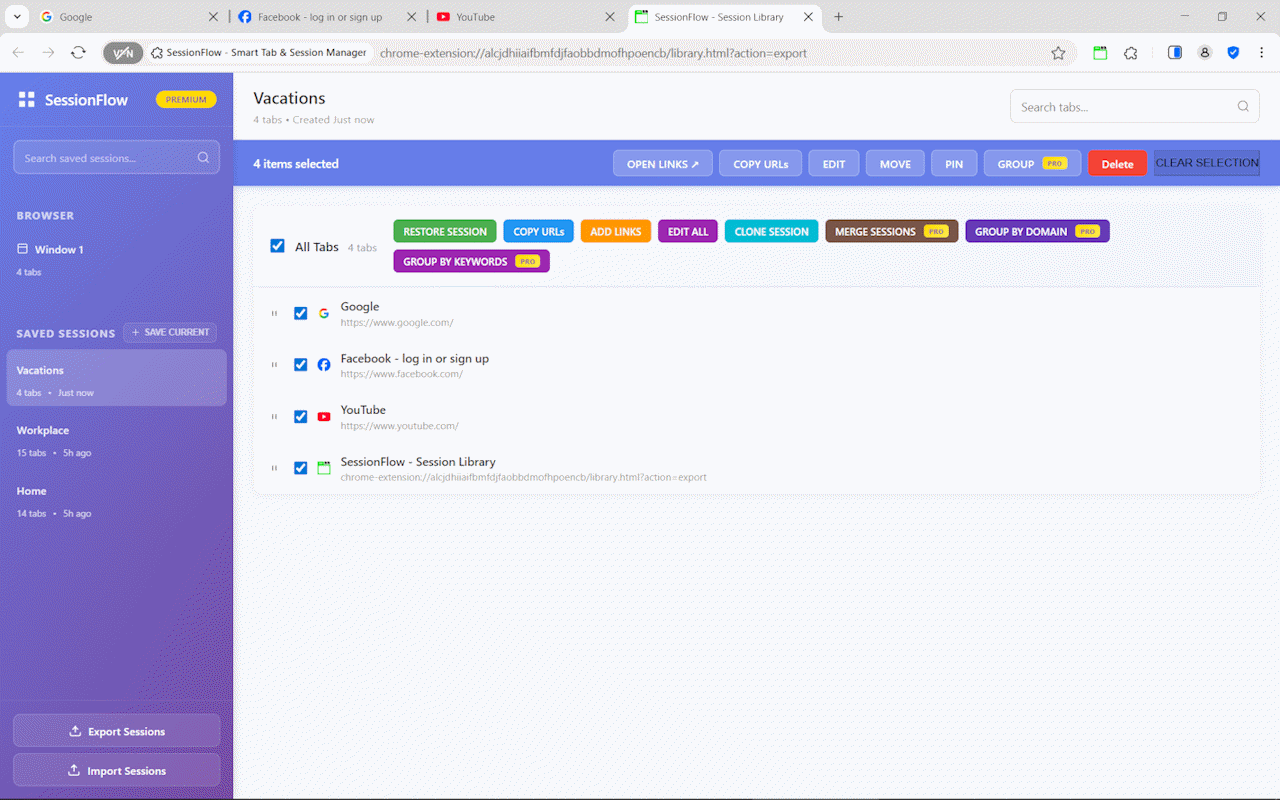
The core functionality of SessionFlow is deceptively simple: save your entire browsing state with a single click. But the devil is in the details. Unlike basic session savers, SessionFlow preserves:
This means when you restore a session, you’re not just getting a list of URLs – you’re getting back your exact browsing environment.
One of SessionFlow’s standout features is its powerful search functionality. Instead of manually clicking through tabs, you can instantly locate any open tab by searching for:
This feature alone can save hours of frustration for anyone who regularly works with multiple research projects or complex browsing sessions.
SessionFlow’s smart grouping algorithms understand your browsing patterns and automatically organize related tabs. Whether you’re researching competitors, managing multiple client projects, or diving deep into technical documentation, the extension learns your workflow and suggests optimal organization strategies.
How many times have you accidentally opened the same page multiple times? SessionFlow automatically detects and eliminates duplicate tabs across all windows, keeping your workspace clean and your computer’s memory happy.
For professionals who need to open specific sets of URLs regularly – think daily monitoring dashboards, research check-ins, or project status pages – the bulk URL opener is a game-changer. No more manually opening each link or dealing with bookmark folders.
One of the biggest productivity killers with heavy tab usage is browser performance degradation. SessionFlow’s hibernation system automatically sleeps inactive tabs while preserving their state, keeping your browser responsive even with dozens of tabs open.
Organize sources by topic, maintain separate sessions for different projects, and preserve complete research trails. The session comparison feature is particularly valuable for tracking how your research evolves over time.
Maintain separate environments for different projects, organize documentation tabs logically, and quickly switch between development contexts. The ability to share session templates with team members streamlines onboarding and collaboration.
Track multiple campaigns simultaneously, monitor competitor activities across different sessions, and organize client projects with dedicated browsing environments. The analytics features help identify which tools and resources you use most frequently.
Organize course materials by subject, manage assignment research, and preserve study sessions for later review. The export functionality makes it easy to share resource collections with classmates or colleagues.
SessionFlow’s auto-save functionality ensures you never lose important browsing sessions due to crashes, updates, or accidental closures. The system intelligently detects significant changes and preserves your work automatically.
All session data is stored locally by default, giving you complete control over your browsing information. Premium users can opt into encrypted cloud sync while maintaining data ownership and privacy.
Understanding your browsing patterns is key to optimization. SessionFlow provides insights into your tab usage, session frequency, and productivity metrics, helping you identify and eliminate time-wasting habits.
The free version of SessionFlow includes core session management, tab search, and basic organization tools – already more powerful than most competing extensions.
The Premium upgrade unlocks automation features like scheduled auto-saves, advanced hibernation controls, unlimited session storage, and sophisticated analytics. For professionals who live in their browser, the Premium features quickly pay for themselves in time savings.
Installing SessionFlow takes seconds, and the intuitive interface means you can start organizing your tabs immediately. The extension works seamlessly with your existing browsing habits – there’s no steep learning curve or complex setup process.
If you’re tired of tab chaos affecting your productivity, SessionFlow offers a comprehensive solution that grows with your needs. It’s not just about organization; it’s about creating a browsing environment that enhances rather than hinders your work.
For anyone who regularly juggles multiple projects, conducts extensive research, or simply wants a more organized digital workspace, SessionFlow represents a significant upgrade to the basic tab management most browsers provide.
Ready to transform your browsing experience? SessionFlow is available now in the Chrome Web Store, with both free and premium options to suit your workflow needs.
Nowadays, efficiently managing and extracting links from websites can make or break your productivity. Enter LinkScalper Advanced Link Grabber – a Chrome extension that transforms the tedious task of link collection into a streamlined, powerful process.
While basic link extractors simply grab visible hyperlinks, LinkScalper goes several steps further. This isn’t just another link scraper; it’s a comprehensive URL management system designed for professionals who need precision, flexibility, and efficiency in their link extraction workflows.
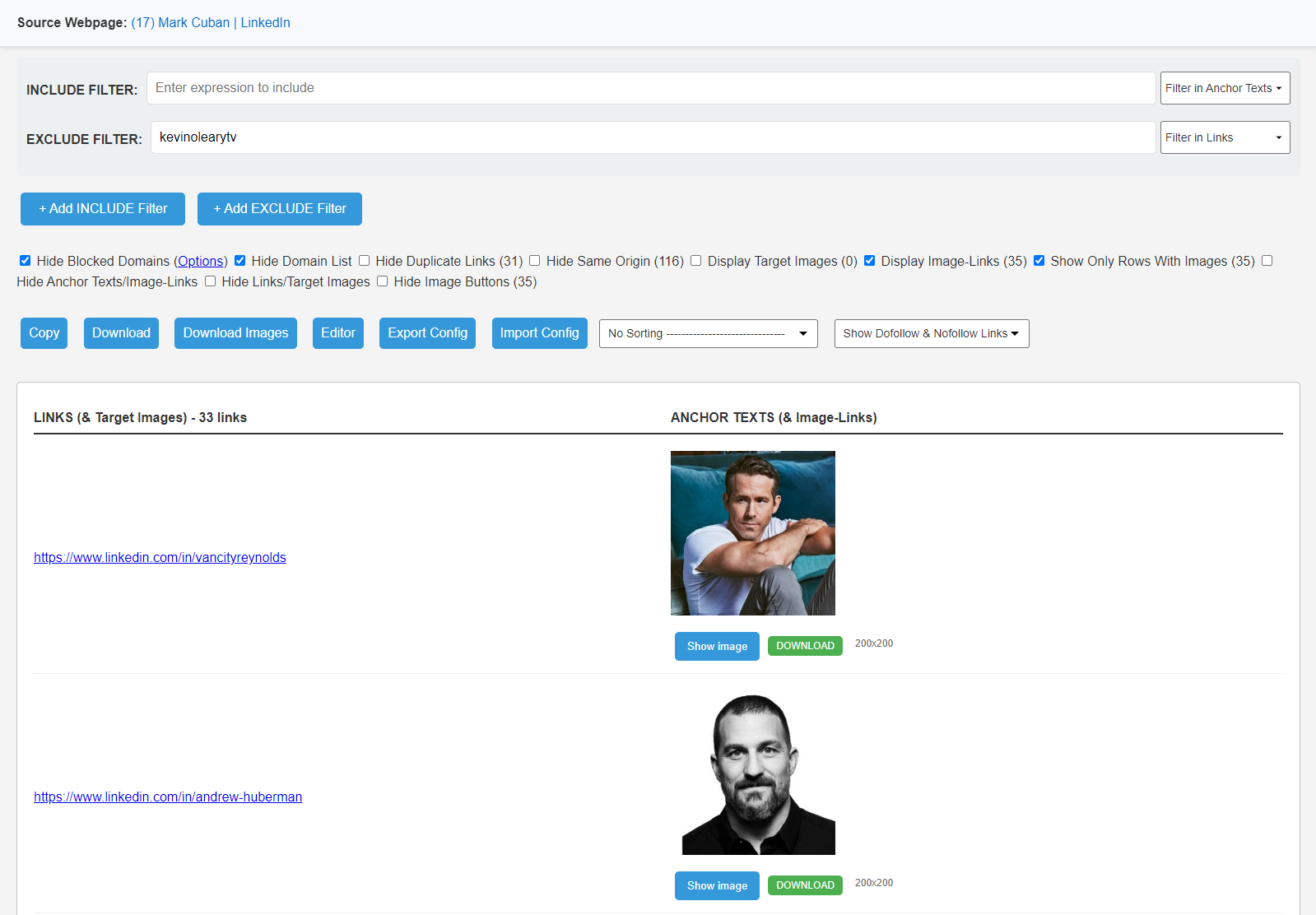
One of LinkScalper’s most impressive features is its dual filtering system. The Include Filters allow you to specify exactly what types of links you want to capture based on URL patterns or anchor text, while Exclude Filters automatically remove unwanted links from your results. This means you can focus on collecting affiliate links, specific domain references, or SEO targets without manually sorting through hundreds of irrelevant URLs later.
For SEO professionals working on competitor analysis or link building campaigns, this feature alone can save hours of manual work that would otherwise be spent cleaning and organizing link lists.
LinkScalper provides complete domain visibility, showing you exactly which websites your extracted links point to. The domain control feature lets you filter results by specific domains or use the ‘Hide Blocked Domains’ functionality to automatically exclude sites you’ve blacklisted.
This is particularly valuable for digital marketers who need to avoid certain competitors or focus their outreach efforts on specific industry domains.
Unlike simple hyperlink grabbers, LinkScalper extracts URLs from multiple sources:
This comprehensive approach ensures you capture every relevant URL on a page, not just the obvious ones.
The extension’s dofollow and nofollow link detection is invaluable for backlink analysis. You can quickly identify which links pass authority and which don’t, making it easier to prioritize link building efforts and audit existing backlink profiles.
The bulk download feature allows you to quickly compile research materials, academic references, or resource lists. Export your findings as TXT or CSV files for easy integration into reports or content management systems.
Use LinkScalper to analyze competitor websites, identify affiliate opportunities, and build targeted link lists for outreach campaigns. The filtering options help you focus on relevant affiliate networks and avoid irrelevant links.
Extract all external dependencies, API endpoints, or reference links from web pages for documentation purposes or security audits.
LinkScalper’s built-in editor lets you modify extracted links without leaving the extension. Add prefixes or suffixes, trim URLs, replace anchor text, or modify URLs directly within the interface.
Sort your link lists alphabetically or randomize them based on your needs. Remove duplicates and filter out internal links to focus on external references.
Export and import settings across devices or share configurations with team members, ensuring consistent workflows across your organization.
Most link extraction tools provide basic functionality with limited customization. LinkScalper addresses the real-world needs of professionals who work with links daily:
Installing LinkScalper from the Chrome Web Store takes seconds, and the intuitive interface means you can start extracting and organizing links immediately. The extension works on any webpage, making it a versatile tool for various industries and use cases.
For professionals who regularly work with web links – whether for SEO analysis, content curation, affiliate marketing, or web development – LinkScalper represents a significant upgrade over basic link extraction tools. Its combination of advanced filtering, comprehensive extraction capabilities, and professional-grade features makes it an essential addition to any digital marketer’s toolkit.
The time savings alone justify the investment, but the enhanced accuracy and organizational capabilities make LinkScalper a game-changer for anyone serious about efficient link management.
Ready to streamline your link extraction workflow? LinkScalper Advanced Link Grabber is available now in the Chrome Web Store.


Elevate your business landscape with our transformative solutions, harnessing innovation to drive…
Elevate your business landscape with our transformative solutions, harnessing innovation to drive…
Elevate your business landscape with our transformative solutions, harnessing innovation to drive…
Elevate your business landscape with our transformative solutions, harnessing innovation to drive…
Elevate your business landscape with our transformative solutions, harnessing innovation to drive…
Elevate your business landscape with our transformative solutions, harnessing innovation to drive…

CodingDir is a premier development company, offering custom web, app, and AI solutions designed to boost efficiency, innovation, and business growth.
Copyright © 2024 CodingDir