

We’ve all been there: you open your browser with good intentions, planning to quickly check one thing. Fast forward two hours, and you’re staring at 47 open tabs, your computer is running like molasses, and you’ve completely forgotten what you originally came to do. If this sounds familiar, you’re suffering from a modern digital ailment that’s more common than you might think – tab addiction.
TabLimit Pro is a Chrome extension specifically designed to break the cycle of tab overload and help you regain control of your browsing experience. But this isn’t just another productivity app – it’s a thoughtfully designed solution that addresses the psychological and practical challenges of modern web browsing.
The Hidden Cost of Tab Overload
Before diving into the solution, let’s acknowledge the real problem. Tab overload isn’t just about computer performance (though having 50+ tabs open certainly doesn’t help your RAM). The bigger issue is mental.
Research consistently shows that excessive multitasking – which is essentially what tab hoarding represents – reduces focus, increases stress, and diminishes cognitive performance. Every open tab represents a potential distraction, a half-finished task, or a “I’ll get to this later” commitment that weighs on your mental bandwidth.
TabLimit Pro recognizes that the solution isn’t just technical – it’s behavioral.
Smart Limiting That Actually Makes Sense
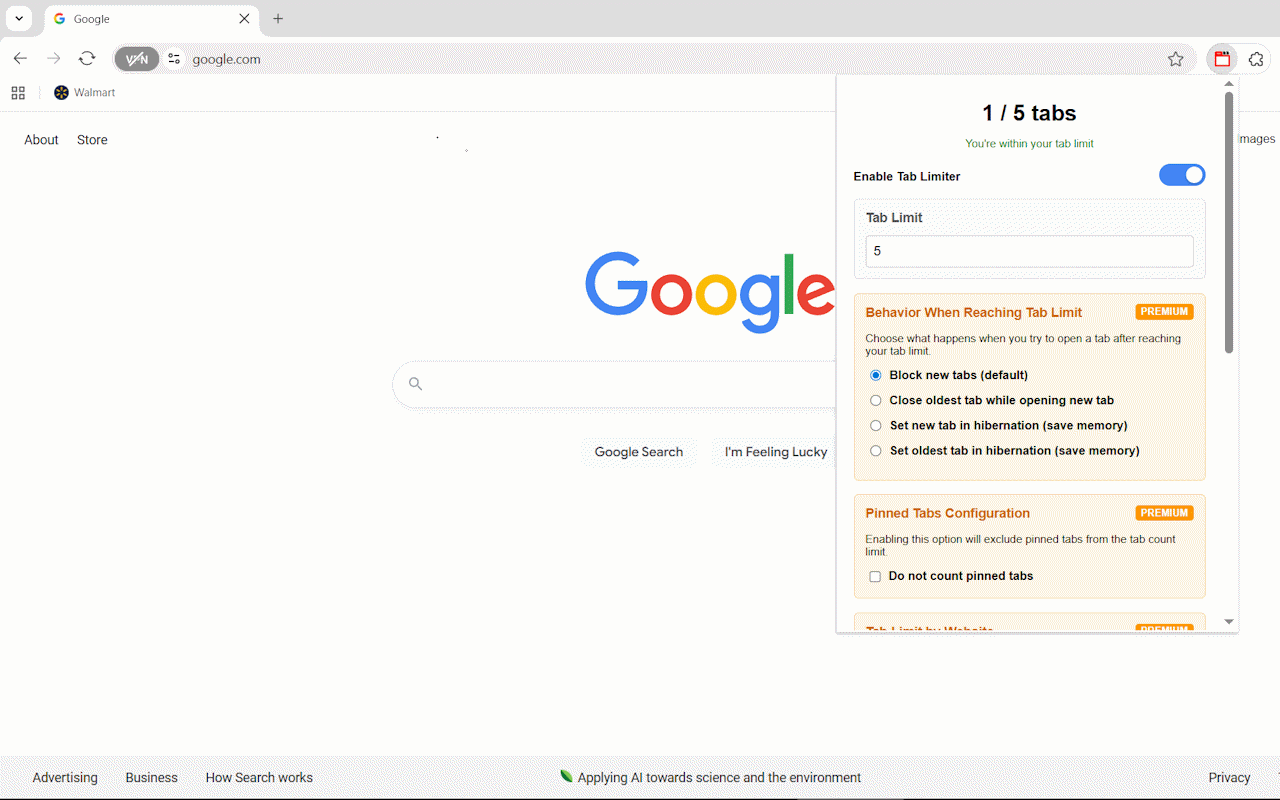
The core concept behind TabLimit Pro is elegantly simple: set a limit on how many tabs you can have open, then let the extension intelligently manage what happens when you hit that limit.
But here’s where TabLimit Pro gets clever. Instead of just blocking new tabs or randomly closing old ones, it offers several intelligent behaviors:
Hibernation Over Elimination
One of the standout features is tab hibernation. When you reach your limit, instead of losing tabs entirely, TabLimit Pro can put older tabs “to sleep.” These hibernated tabs consume virtually no memory but remain easily accessible when you need them. It’s like having the best of both worlds – memory efficiency without the anxiety of losing important pages.
Smart Auto-Close
The auto-close feature targets your least recently used tabs, ensuring that the content you’re actively working with stays available while clearing out the digital clutter that accumulates naturally during browsing sessions.
Customization That Respects Your Workflow
What sets TabLimit Pro apart from basic tab limiters is its understanding that different websites serve different purposes in your workflow.
Site-Specific Intelligence
The premium features include site-specific limits, which is brilliant for managing different types of browsing behavior. You might allow unlimited tabs for work-related sites like Google Drive or GitHub, while limiting yourself to just 3 YouTube tabs during work hours. This nuanced approach acknowledges that not all web browsing is created equal.
Whitelist Functionality
Essential tools like email, calendar apps, or project management platforms can be completely excluded from tab counting. Your core productivity tools remain always available without interfering with your focus limits for other types of browsing.
Perfect for Different Types of Users
Students and Researchers
TabLimit Pro is particularly valuable for academic work, where research sessions can quickly spiral into dozens of open papers, articles, and reference materials. The site-specific limits let you maintain higher tab counts for educational resources while keeping entertainment sites strictly limited during study sessions.
Remote Workers and Digital Professionals
For those working from home, the temptation to “quickly check” social media or news sites can derail productivity. TabLimit Pro helps maintain professional focus by setting strict limits on distracting sites while allowing unlimited access to work tools.
Digital Minimalists
If you’re trying to cultivate more intentional technology use, TabLimit Pro supports mindful browsing by encouraging you to think carefully about what you really need open at any given moment.
The Psychology of Productive Browsing
What makes TabLimit Pro particularly effective is how it addresses the psychological aspects of tab management. The extension doesn’t just impose arbitrary restrictions – it helps you develop better browsing habits.
The visual feedback (like real-time tab counting and memory usage statistics) creates awareness of your browsing patterns. Many users report that simply seeing how many tabs they have open is enough to encourage more mindful browsing behavior.
The customizable notification system lets you choose how assertive you want the extension to be. Some users prefer gentle badge notifications, while others benefit from more prominent alerts when approaching their limits.
Privacy and Performance Done Right
In an era where many extensions request extensive permissions and send data to external servers, TabLimit Pro takes a privacy-first approach. All functionality happens locally in your browser, with no data collection or external transmission.
The extension is also built with performance in mind. Ironically, an extension designed to improve browser performance could potentially slow things down if poorly implemented. TabLimit Pro uses minimal system resources while providing its functionality, ensuring that the cure isn’t worse than the disease.
Free vs. Premium: What You Get
The free version provides core tab limiting functionality with basic notifications – already enough to make a significant difference in your browsing experience.
The Premium upgrade unlocks the advanced behavioral options (hibernation, smart auto-close), site-specific limits, whitelist functionality, and settings backup. For users who want fine-grained control over their browsing environment, these features quickly justify the upgrade.
Real Results from Real Users
User feedback consistently highlights two main benefits: improved focus and reduced digital stress. The 40% improvement in browsing focus that users report isn’t just about productivity – it’s about feeling more in control of your digital environment.
The 30% reduction in browser memory usage is a tangible bonus, especially for users with older computers or limited RAM.
Getting Started
The beauty of TabLimit Pro is its simplicity. Install the extension, set your preferred tab limit (many users start with 10-15 tabs), choose your behavior preferences, and let the extension work in the background.
The learning curve is minimal, but the impact on your browsing habits can be significant. Most users find that even just having a tab limit in place naturally encourages more intentional browsing.
The Bottom Line
TabLimit Pro addresses a real problem that affects millions of browser users daily. Tab overload isn’t just a technical issue – it’s a focus and productivity challenge that reflects our complicated relationship with digital information.
By providing intelligent, customizable tab management, TabLimit Pro helps users develop healthier browsing habits while maintaining the flexibility needed for productive work.
If you find yourself constantly overwhelmed by browser tabs, struggling to focus while browsing, or dealing with sluggish browser performance due to tab overload, TabLimit Pro offers a thoughtful solution that respects both your productivity needs and your browsing preferences.
Ready to take control of your tabs? TabLimit Pro is available now in the Chrome Web Store, with both free and premium options to match your browsing style.